Sticker Studio: Sticker Maker
Turn your photos into WhatsApp stickers
Sticker maker for WhatsApp: remove the background, add an outline and text.
Free. Nothing to install, no account.
How it is used
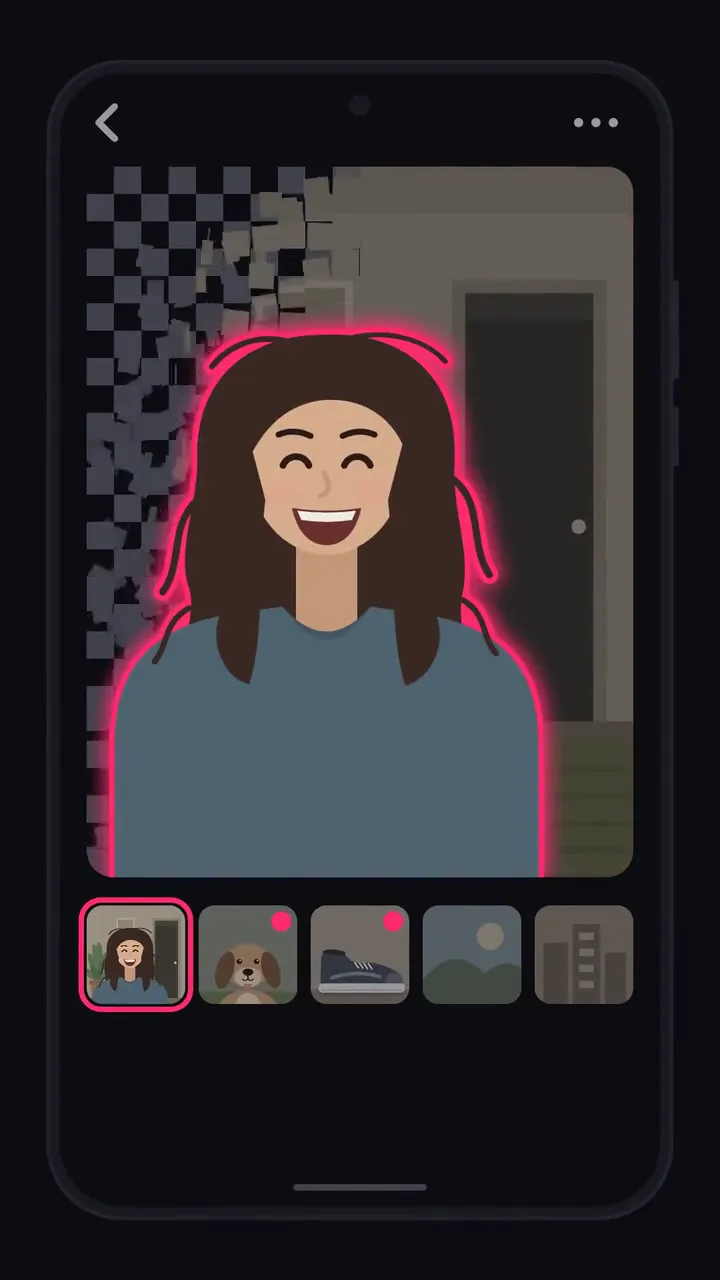
Sticker Studio is a sticker maker that turns your photos into custom stickers for WhatsApp. Pick a photo, and the background is removed automatically, right on your phone. Add an outline and a few words, save it to a sticker pack, and add the pack to WhatsApp. Every new pack already holds 3 ready-made stickers, so it's ready for WhatsApp from your very first sticker.
PHOTO TO STICKER IN SECONDS
Make your own stickers from any photo. Choose a photo from your phone, take one with the camera, or share a picture to Sticker Studio from another app. You don't draw around anything: the person, pet, or object stays, the background goes, and you get a clean sticker with a transparent background. No photo handy? Try the sample photo first.
SEVERAL PHOTOS AT ONCE
Pick up to 10 photos in one go, tap through them to see each cutout, and add them all to your pack with one tap. Tap Make another after any sticker and the photo picker opens right away.
TOUCH UP THE EDGES
If the background remover missed a spot, the erase brush takes away what's left of the background and the restore brush paints back a hand or an ear. Set the brush size, pinch to zoom in on fine edges, hold to see the original, and undo or redo any stroke.
OUTLINE AND TEXT
Pick one of 3 outline widths, or none, in 5 colors, and see it on the sticker as you choose. Write a short line of text on it in the same colors; it gets a contrasting edge, so it stays readable in any chat.
STICKER PACKS FOR WHATSAPP
Your stickers go into a pack next to 3 ready-made ones, a cat, a dog, and a turtle, so the pack can go to WhatsApp right away. Delete the ready-made ones whenever you like; once the pack is full, each new sticker of yours replaces one of them, and after that a new pack opens for you. Every pack gets its own name, and Sticker Studio warns you before two packs share one. Give each sticker 1 to 3 emoji so WhatsApp can suggest it while you type. Stickers you add later appear in WhatsApp the next time you open its sticker screen. Works with WhatsApp and WhatsApp Business (WAStickerApps).
SHARE ONE STICKER ANYWHERE
Using another messenger? Share any single sticker as a transparent image.
YOUR PHOTOS STAY ON YOUR PHONE
The background remover runs on your phone after a one-time download, so your photos are never uploaded.
HOW CREDITS WORK
Removing the background, editing, and sharing are free. Adding a sticker to a pack uses credits, and the sticker from the sample photo is free. You start with free credits, and free credits refill over time. When you want more, watch an ad, buy a credit pack in Google Play, or get Unlimited, a one-time purchase and not a subscription, after which adding stickers never uses credits. Credits are kept on our server, so using them needs an internet connection.
NO SIGN-UP NEEDED
Open the app and start making stickers. If you want the credits you've bought to follow you to a new phone, sign in with a Zaparo ID using Google or your email.
FEATURES
- Automatic background removal on your phone
- Photos from your phone, the camera, or other apps, up to 10 at once
- A sample photo to try first
- Erase and restore brushes with zoom, undo, and redo
- 3 outline widths, or none, in 5 colors
- A line of text on each sticker
- 1 to 3 emoji per sticker
- Sticker packs that start with 3 ready-made stickers and hold up to 30
- Works with WhatsApp and WhatsApp Business
- Share a single sticker as a transparent image
- Free credits that refill over time, credit packs, and Unlimited, a one-time purchase
- 19 languages; change the language from the home screen or in Settings
Sticker Studio is independent and isn't affiliated with WhatsApp or Meta.
- The app speaks
- English, Turkish, Arabic, Dutch, French, German, Hindi, Indonesian, Italian, Japanese, Korean, Polish, Portuguese, Russian, Spanish, Thai, Ukrainian, Vietnamese, b+zh+Hant, es-ES, zh
- Privacy policy
- Privacy policy